Showing posts with label Security. Show all posts

Saturday, 8 December 2018

Sega System 16 / 18 / 24 / X Security Programming Guide

Dear all, after some lengthy testing we are happy to release full details on the security programing of the Hitachi FD1089 / FD1094 cpus used in Sega's System 16 / 18 / 24 / X motherboards.


This guide is the result of several years of work by a small group of arcade enthusiasts to unravel the secrets of the security implementation found in one of the most loved and popular arcade game platforms. Thanks to this work it is now possible to fully preserve most Sega 16 bit systems enabled with security as fully working unmodified originals.

Unlike previous projects this time we recommend the usage of a dedicated pcb to interface with the chips due to the high pin count involved in the programming.

Additional details of the inner workings of Sega's FD security modules will be published over time in this blog. Work on the earlier MC 8 bit modules used in some System 1 / 2 boards and sound of Sega 16 is still in progress and will be published when completed. 

Thanks to everyone who has helped make this a reality including all kind donors and testers.

Sega Hitachi FD1089 / FD1094 Security Programming Guide

This document will guide you through the basics of preparing your setup and testing the a clean desuicide method on any known Sega 16 / 18 / 24 / X board revisions using Hitachi FD1089 or FD1094 modules. You can find a pdf copy of this guide and code on the following link: https://github.com/ArcadeHacker/ArcadeHacker_Sega_Hitachi


What's needed


Arduino programmer hardware


  • Soldering iron and solder

Sofrware


Assembling and preparing your Arduino programmer


This step is pretty straight forward, solder all the pin headers to your programmer pcb as well as the IC 64pin socket. The fully assembled pcb looks like this:


After the pcb shield is ready just sandwich it together with your Arduino Mega 2650.


Download and install software for your OS from https://www.arduino.cc/en/Main/Software
Select the right arduino board type before connecting your arduino to your computer. Tools -> Board -> Mega 2560.


Connect the Arduino to your computer by plugin the USB cable and choose the correct serial port in Tools -> Port. 

Open the ArcadeHacker Sega FD1094 or FD1089 .ino file in the Arduino environment. Compile and Upload the sketch to the Arduino unit.

Open the Arduino IDE serial monitor found in Tools -> Serial Monitor. Configure the two settings found in the lower right part of the serial monitor window as follows: Carriage Return and 115200 bauds. 


Close and open the serial monitor, you should now see the following text on screen. If this is the case you have successfully setup and configured your Arduino programmer. 


Programming security keys


Look inside the Arduino FD1089 or FD1094 code for the game you intend to program the encryption keys into the FD chip and uncomment the desired line of code. Only one game can be uncommented at any time, don't forget to comment the default blank game setting at the beginning of the list.


If the above was done correctly you should now compile and upload the program to your Arduino without problems. Once the upload process is finished open the serial monitor found in Tools. The program prompt should display the game you have configured. 


For this example we have selected "eswat" a System 16 game using the Hitachi FD1094 security module "317-0160". FD1094 security modules can be repurposed for any game and it is not required that a label in the cpu module matches the intended game security key to be programmed. This will not be the case with FD1089 modules as two different encryption schemes exist (FD1089A & FD1089B): A variants of the chip are only compatible with games roms for other A variants, and B variants for B games only.


Having inserted the module in the socket we can proceed to program the security keys by typing w and pressing enter. Make sure you replace the module battery if necessary before attempting a key load, a new battery will last at least 20-30 years so don't expect to have to repeat this often. Once the process finishes you can disconnect the Arduino module from your computer and remove the cpu module.


If you would like to verify that the contents of the cpu match the intended configuration loaded in your programmer you can perform a verification by typing v and pressing enter. This verification compares a 1 bit parity per byte calculated internally by the security module against the encryption configuration in your Arduino. 

WARNING: This verification procedure is 100% safe in FD1094 modules. Unfortunately this is not the case with FD1089 modules as the verification will delete the data inside your module, please do not attempt verification with any valuable FD1089 modules especially if currently undumped or not preserved in Mame. 


Final words


This is all there is to preserving your Sega FD1089 / FD1094 modules as working units, we hope this milestone will help you and the rest of the arcade community preserve your loved games as originals and stop the general discarding of Sega Hitachi modules. 

As mentioned in the opening of this post, a number of follow up articles in this blog will reveal the inner workings and curiosities of these artfully crafted security modules. 

Happy preservation. 

Tuesday, 5 June 2018

Sega System 16 Security Reverse Engineering


Dear all,

I'm glad to announce the successful reverse engineering of Sega's System 16 cpu security modules. This development will enable collectors worldwide preserving hardware unmodified, and stop the general discarding of Hitachi FD modules.

The project is right now involving external testers so expect further details and full disclosure over the coming weeks.

Eduardo.

Project credits: Eduardo Cruz, Rockman (Pere ViciƩn), Digshadow, with support from Shinichiro Baba, Ricardo Fernandez-Vega, Andrew Welburn and other kind donators.


Tuesday, 2 January 2018

A Journey Into Capcom's CPS2 Silicon - Part 2

Welcome to the second post in the Capcom CPS-2 reverse engineering series, if you missed the previous post you can find it here:


Inside the custom chips of CPS2


Capcom's Play System 2, also known as CPS2, was a new arcade platform introduced in 1993 and a firm call on bootlegging. Featuring similar but improved specs to its predecessor CPS1, the system introduced a new security architecture that gave Capcom for the first time a piracy-free platform. A fact that remained true for its main commercial lifespan and that even prevented projects like Mame from gaining proper emulation of the system for years.


Chip Makers

Capcom's extensive use of customs in CPS2 spreads over a total 11 QFP type chips, as part of this project each of the chips were decapped and identified as follows:

A board (Base board)

DL-0311: Ricoh A5C series, standard cells. (Also found in CPS1) Datasheet
DL-0921: Ricoh A5C series, standard cells. (Also found in CPS1) Datasheet
DL-1123: Hitachi HG62F series model 22, gate array. Datasheet
DL-1425: AT&T Digital Signal Processor WEDSP16A-M14. (Also found in CPS1.5) Datasheet
DL-1625: VLSI Technology (VTI) VGT300 series model 022, gate array. Datasheet
DL-2227: Hitachi HG62E series model 08, gate array. Datasheet

CPS2 A Board 93646A-3 Custom chips highlighted


B board (Top board)

DL-1525: Motorola H4C series model 057, gate array in combination with a 68000 cpu megacell (CPM68K REV7-89). Datasheet
DL-1727: Fujitsu CG24 series model 692, gate array. *
DL-1827: Fujitsu CG24 series model 692, gate array. *
DL-1927: Fujitsu CG24 series model 512, gate array. *
DL-2027: Fujitsu CG24 series model 512, gate array. *

* No datasheet available for the Fujitsu CG24 series, please share any.

CPS2 B Board 93646B-6 Custom chips highlighted


Gate Array technology

Used in most CPS2 custom chips, a gate array circuit is a prefabricated silicon chip circuit with no defined functionality, in which transistors, standard NAND or NOR logic gates, are placed following a regular pattern and manufactured on a wafer, this half baked wafer is known as master slice.

Common advantages of Gate Arrays designs over Full-Customs according to TU Delft:

Minimization of the fabrication time: Because the chips are prefabricated (the transistors are already on the master image), the silicon foundry only processes the masks related to metal wires. As compared to full custom layout, the number of masks processed by the silicon foundry is often reduced by more than 60%.

Minimization of the design time: The time involved in designing a cell layout is reduced dramatically (as compared to full-custom) because the transistors are pre placed on the image. Typically, it takes only a few minutes to layout a flipflop or a combinatorial gate, and the designer does not need to know much about the process design rules.

Minimization of the chip cost: The layout design starts with a prefabricated master image. This is a semi-manufactured article that can be produced in large quantities. Consequently, it can be cheap.


Gate Array die size and development time compassion versus other chip design technologies


The Fujitsu gate array chips featured in CPS2's B board belong to the CG24 series and use a 0.8 micron CMOS process. Fujitsu uses a block-level placement and routing scheme commonly known as "fishbone".


Markings inside CPS2 Gate Array chip DL-2027


Unwired section of NAND sea-of-gates inside a Fujitsu CG24 chip

Logic inverter (NOT) implemented in Fujitsu's NAND sea-of-gates

Fujitsu's gate array technology is discussed in more detail in 1978 USPTO patent 4,412,237: https://docs.google.com/viewer?url=patentimages.storage.googleapis.com/pdfs/US4412237.pdf


Capcom's deep pockets

Interestingly enough, several of the B board's chips used by Capcom show a very low utilization of resources being the worst offender chip DL-2027. In IC density terms its contents could be classified as mostly empty space. 

Given the expensive nature of the end to end design and fabrication of these devices one must think that perhaps Capcom's market successes enabled the company not to spare in resources.


Highlighted in yellow: total die area utilization inside DL-2027 


The Mysterious CPU


Contrary to popular belief, Capcom's CPS-2 cpu does not reside on the A bottom board of the system, instead the cpu is found on the B board and inside the big 208 pin QFP chip labeled as DL-1525. MAME's own documentation on CPS-2 does not help this belief either as it also states the system cpu is DL-1625, an A board chip.


Capcom DL-1525 dated 1993 week 51 source id JSX02RJ524AU03

DL-1525 hosts inside a massive die measuring around 7x7mm in size featuring a majestic Motorola 68000 megacell core surrounded by a vast 3-layer gate array. This monster IC is based on the Motorola H4C gate array series and uses a gate length of 0.7 microns (700 nanometers). To date it is the smallest feature sized chip I have worked on since I began reverse engineering ICs.


DL-1525 is a Motorola H4C057 class gate array in combination with a 68k cpu core (top right)


Small section of DL-1525 captured at 50x magnification. Three routing metal layers are visible.

Cross-section view of a Motorola H4C gate array describing its composition


DL-1525 Ancestry

A newsletter from Dataquest from May 1988 traces back the origins of Motorola's blending of 68000 cores with gate arrays to the world of laser printers. An extract of such IC industry newsletter reads as follows: 
Motorola is designing gate-array-based interface chips for use in laser printers. The chips will contain a core of the 68000 microprocessor and the dedicated laser printer functions. The LPC-1 will have 5,000 gates and will be fabricated with a 2-micron CMOS technology, while the ALPC-1 will have 16,000 gates and will be the first commercial application of Motorola's HDC series of 1-micron CMOS channelless architecture gate arrays. The LPC-1 is currently available in sample quantities; samples of the ALPC-1 will be available in December, with volume production scheduled for February 1989.

In fact, additional research shows chips with similar source identification marks to Capcom's DL-1525 have been in use in commercial laser printers such as models A258/A259/A260 made by Ricoh. The following parts catalog mentions at least two relevant ICs listed as follows:

 JSC05RR519AU15   208QFP // RICOH IPU BOARD A259 5146 / A260 5146
 JSC05SV519AY17   240QFP // Ricoh main control board A258 5090

Another close brother to DL-1525 is Motorola's own MC68302 "Integrated Multiprotocol Processor" chip. This IC employs a similar gate array and embedding of a 68k cpu core inside. More details about it can be found in the following document and product manual.


MC68302 internals description found in "Image Processing For Future High Energy Physics Detectors"

Other chips from Motorola are known to exist with even closer source id numbers to Capcom's DL-1525, their purpose or end product usage are unknown: 

 JSX02RJ514AU17   208QFP // H4C057-68K 
 JSX02RJ524AU03   208QFP // Capcom CPS2 DL-1525
 JSX05PR511AW26  144QFP
 JSX05PR511AW27  No info
 JSX38PG511AJ03   No info


DL-1525 in the wild

Another interesting finding regarding DL-1525 was the availability of chip stock in Alibaba.com marketplace, during March of 2017 and to test the listing veracity I was able to successfully purchase brand new stock of JSX02RJ524AU03 from a Chinese reseller. At the time of writing of this blog post such stock seems to be still listed on sale online. This chip doesn't seem to be the only Capcom device being sold in the wild, other chip codes are available to purchase online. 

I guess this is of no commercial relevance to Capcom anymore, but overall it doesn't show great asset control practices.


Two NOS units of Capcom's DL-1525 chip sourced from China, chips dated 1998 week 24

This is all for now, I hope you have enjoyed Part 2 of the CPS2 reverse engineering series. On the next post we will explore how and where Capcom hided its CPS2 security implementation. Stay tuned.

Part 3

Monday, 20 March 2017

A Journey Into Capcom's CPS2 Silicon - Part 1

capcom cps2

Capcom's Play System 2, also known as CPS2, was a new arcade platform introduced in 1993 and the company call on bootlegging. Featuring similar but improved specs to its predecesor CPS1, the system introduced a new security architecture that gave Capcom for the first time a piracy-free platform. A fact that remained true for its entire commercial lifespan and that later on it even prevented projects like Mame from gaining proper emulation of the system for years.

Whereas CPS1 philosophy on protection had to do mainly with providing a mechanism to control game pcb conversions, CPS2 instead brought back the focus to cpu code encryption just like its old ancestor Kabuki and Capcom's first go on security. Using a similar approach to Kabuki, CPS2 employs battery backed ram hidden away from user access, once this battery runs out the information needed to run the game is lost with it rendering the game unusable for life.


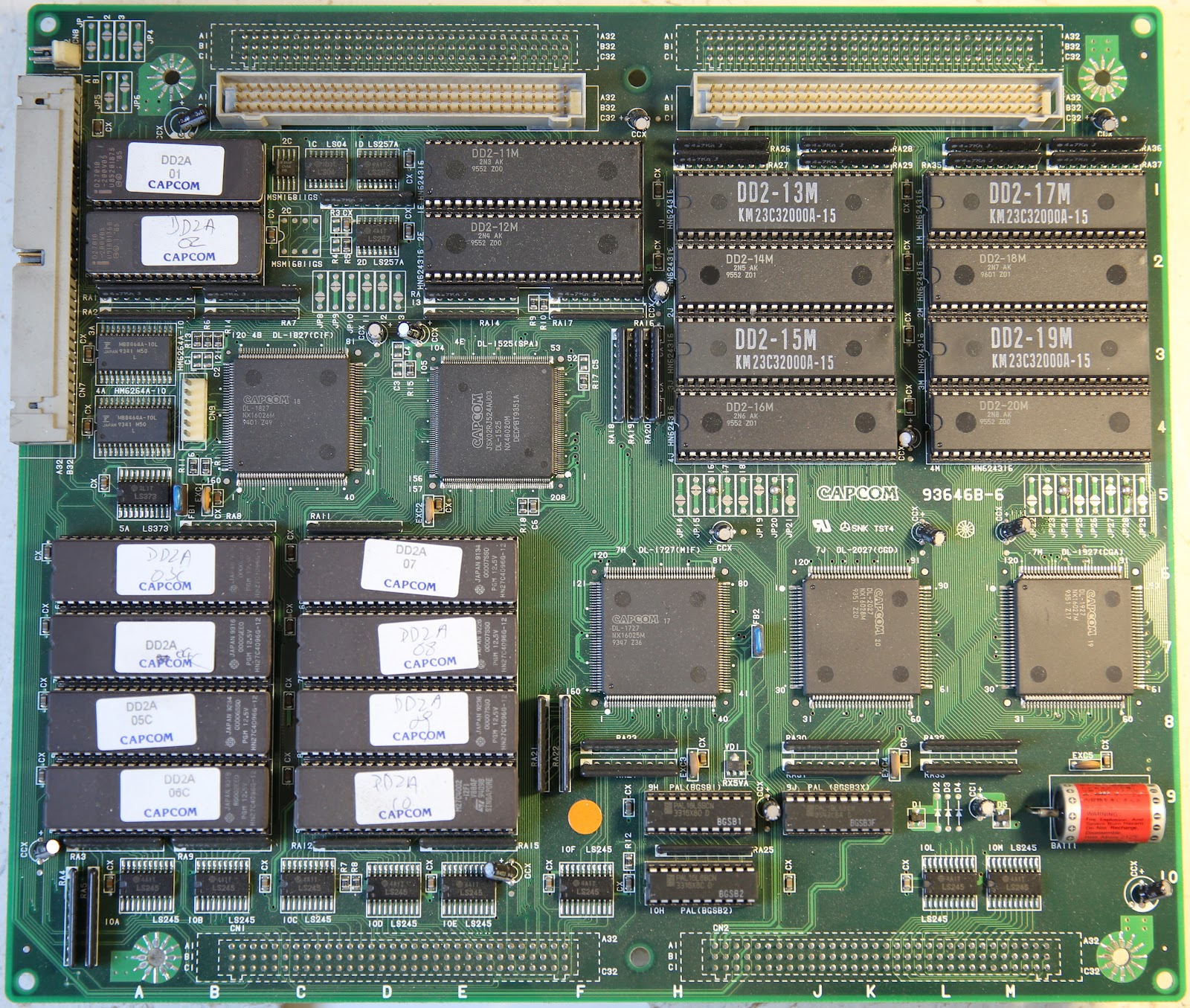
Enclosed in a plastic shell, CPS2 retains CPS1's characteristic 2-layer pcb assembly style consisting on a base board known as A board, and a game board known as B board. Some later games added additional boards featuring expanded memory and cross-game communication capabilities. The two most important differences of this new generation system are: 1) the A board no longer features the system main cpu, this is now moved to the top B board, and 2) the amount of custom chips has grown considerably as seen in the images below.

CPS2 A base board outside of its plastic shell

CPS2 B top board removed from its plastic shell

A later cost down revision of CPS2 shrank the pcb stack to just one pcb enclosed in a metal black case. Most roms also replaced by a single flash memory module, a technology introduced first in Capcom's CPS3 system in 1996.

"All-in-one" CPS2 cost down revision removed from its case


Encryption meets conservation

First attempts to take control of the platform started circa 1999 by the CPS-2 Shock team, with early emulation following soon in the year 2001 right at the end of its commercial lifecycle. The platform saw one last commemorative game title release from Capcom in December of 2003: Hyper Street Fighter II: The Anniversary Edition, so technically speaking emulation did happen during its commercial life.

A bug found in Capcom's security implementation allowed unencrypted memory dumping on the fly, this discovery enabled the CPS-2 Shock team to retrieve clear program code dumps that led to the production of non-encrypted game rom sets for emulation and dead board "phoenixing", a term used by the arcade community referring to game boards altered to run unencrypted game code.

Thanks to these efforts emulation became possible and countless CPS2 dead boards were converted to run unencrypted versions of games thus saved from hitting the bin.

Capcom's encryption mystery remained a secret for six more years until in 2007 a team composed by Charles McDonald, Andreas Naive and Nicola Salmoria (Mame founder) managed to crack the algorithm via custom hardware and mathematical analysis. Their work revealed CPS2 used two four-round feistel ciphers with a 64 bit key and at this point original code emulation became possible.

From there on the picture for CPS2 hardware owners remained pretty much the same: run out of battery and lose your original game forever, phoenixing your board was the only way out of the situation, but at least it was an option.


Capcom's Customfest

CPS2's use of customs was extensive featuring as many as 11 custom made QFP chips, all of them stamped with Capcom logos. For years the maker, exact nature and purpose of many of  these chips has also been a mystery, something especially true for the ones located on the top B board as many of the A board customs are just a continuation of the ones found in CPS1.
Capcom QFP 160 pin custom chip dated Week 47 1993 

The level of custom integration in CPS2 even touched its main cpu, previously featured in CPS1 as a single Motorola 68000 chip, the arrival of CPS2 saw the 68000 cpu fading away somewhere inside one of the new custom chips, nobody exactly knew which. Another interesting thing about the customs found on the top B board is the fact that they all receive battery power while the board is at rest, an obvious exercise to hide away its security implementation and possible targets.


The widow maker

Present in CPS2 systems since B board revision 5 (93646B-5), this little JST NH 6 pin type connector became over time an item of interest and research by the curious. Its purpose unknown but contained a nasty surprise for whoever was brave enough to mess with it: it killed your board.

CPS2 CN9 connector

This connector brought many questions without answer and one clear result: messing with CN9 suicided your board exactly as running out of battery would do. Why Capcom would include such feature? How was it related to the system encryption? Was it of any real use? or could it just be a distraction?

Over the next series of articles we will explore the inner workings of Capcom's CPS2 security implementation, these findings and discoveries are part of the efforts that led to successful reverse engineering of the system security programming methods late last year: Capcom CPS2 Security Programming Guide.

Stay tuned for more.

Part 2

Tuesday, 13 September 2016

Capcom CPS2 Security Programming Guide

Dear all, after a few months of testing we are extremely happy to release the new clean desuicide / security programing method for Capcom's CPS2 hardware.


This guide is the result of almost two years of work by an small group of arcade enthusiasts to unravel the secrets of the security implementation found in one of the largest and most popular arcade platform systems. Thanks for this work it is now possible to fully preserve any CPS2 systems as original hardware.

Over the coming weeks additional details about the CPS2 hardware internals will be released providing unseen insights into how Capcom implemented security.

Thanks to everyone who has helped test and validate this release throughout the summer, special thanks to Bill DeLeo, Jeremy Walski, Leonard Oliveira and rtw.


Capcom CPS2 Security Programming Guide

This document will guide you through the basics of preparing your setup and testing the new clean desuicide method on any of the known CPS2 board revisions. You can find a pdf copy of this guide and code on the following link: https://github.com/ArcadeHacker/ArcadeHacker_CPS2


What's needed
Arduino programmer hardware


  • Power supply capable of 5 volts @ 1.5 amps or more, eg: arcade or ATX PC power supply.


  • Soldering iron and solder


CPS2 motherboard tools and supplies


Software


Assembling and preparing your Arduino programmer
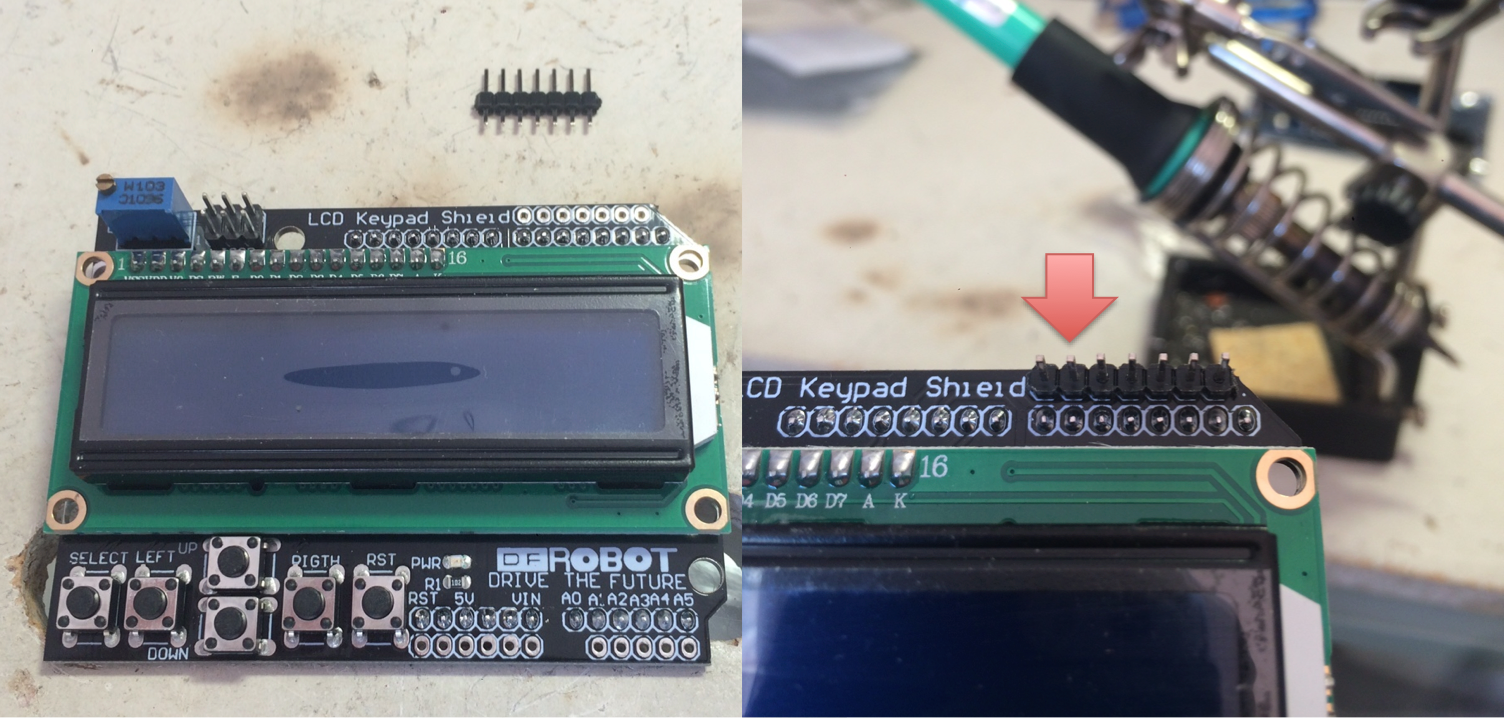
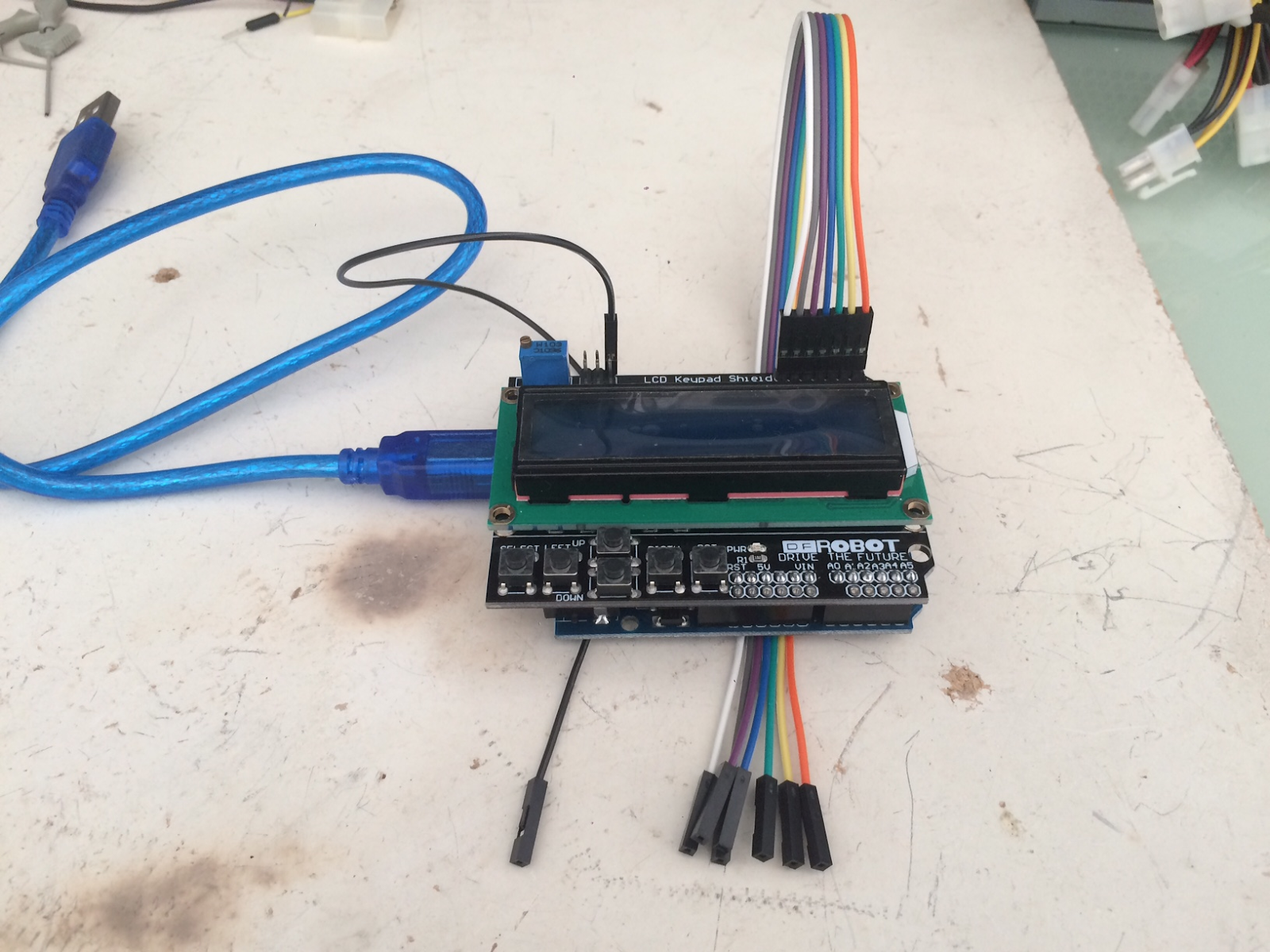
  1. Solder the 7 pin strip to the top right most socket of the LCD Keypad Shield


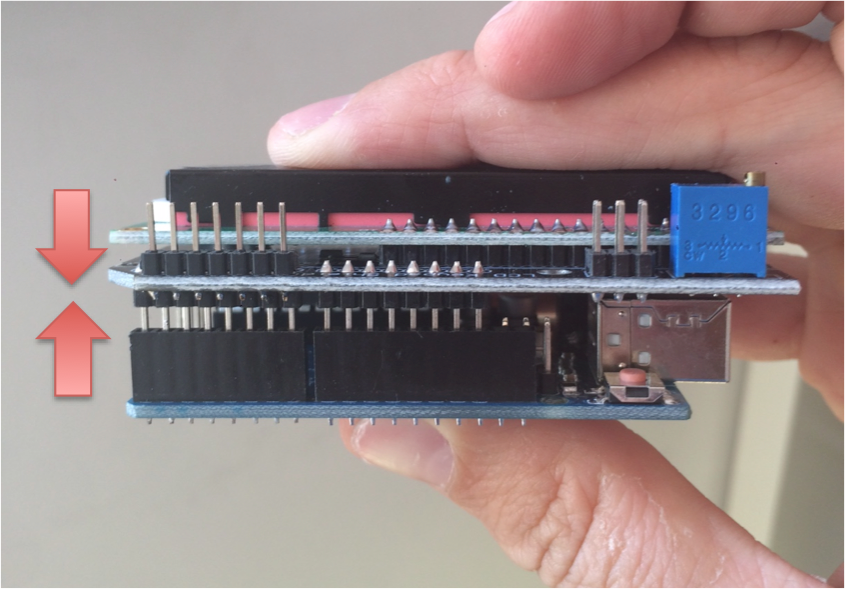
  1. Assemble the Arduino Uno and LCD Keypad Shield together


  1. Download and install software for your OS from https://www.arduino.cc/en/Main/Software
  2. Connect your arduino to your PC via USB
  3. Open the ArcadeHacker_CPS2.ino file in the Arduino environment.
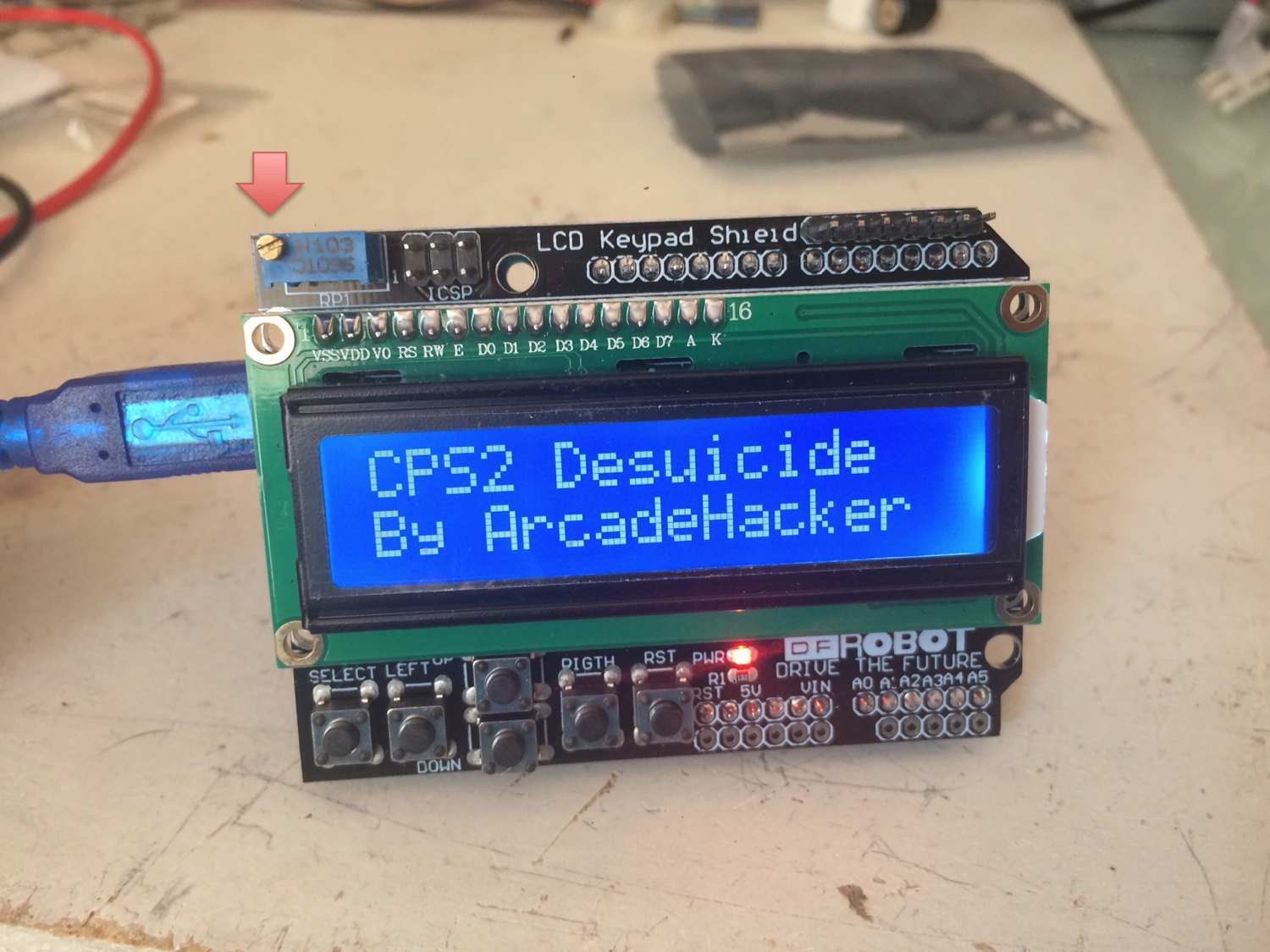
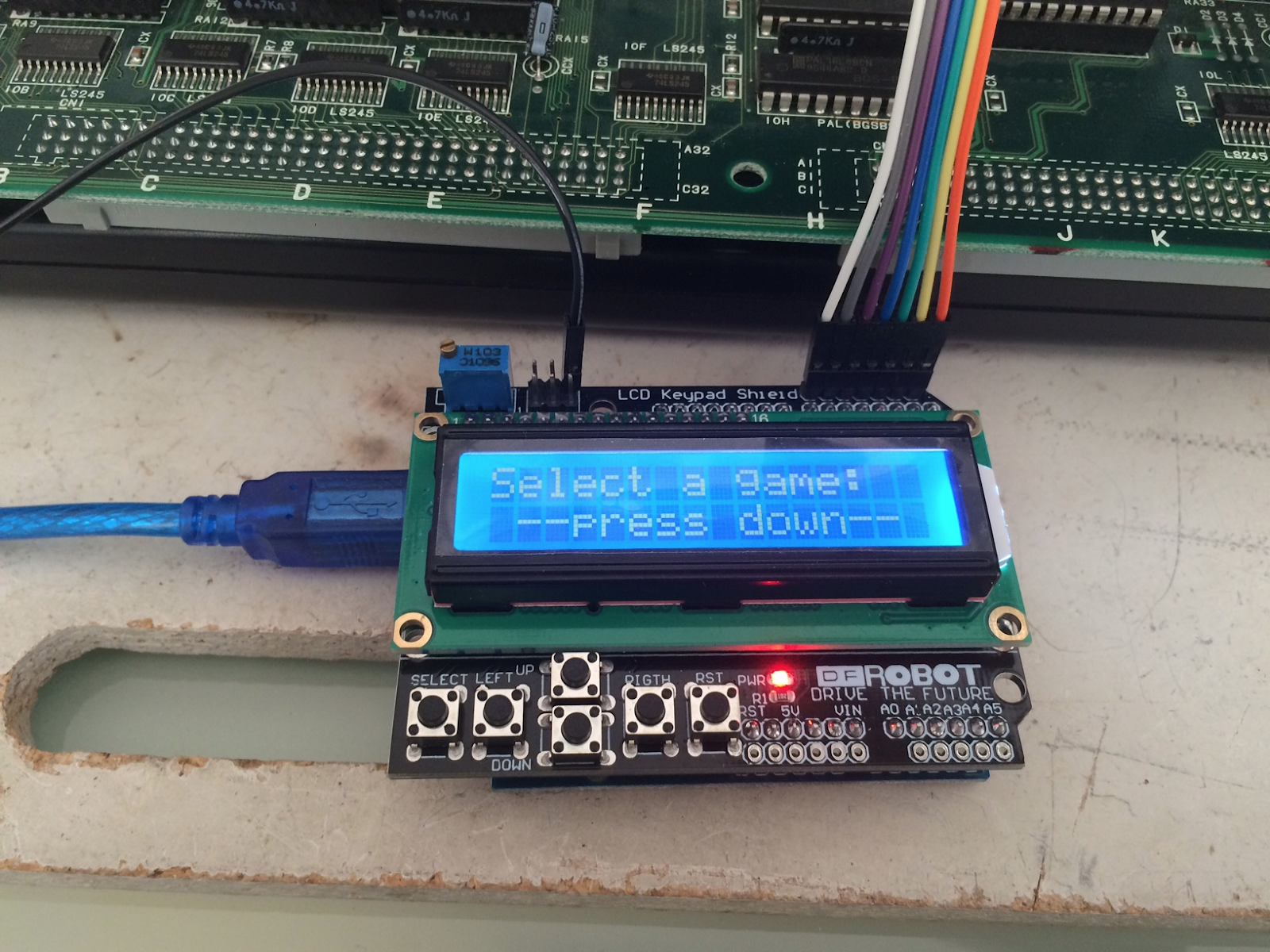
  4. Compile and Upload the sketch to the Arduino, next boot sequence should display what's shown below. If you can't see anything you may want to double check the screen contrast setting.


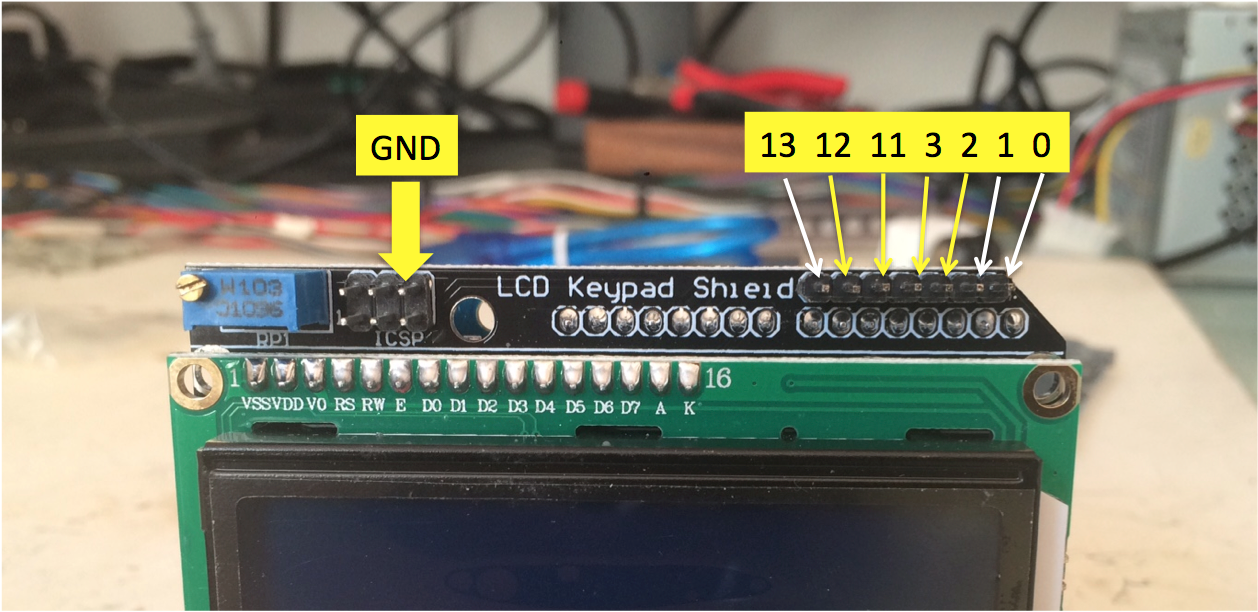
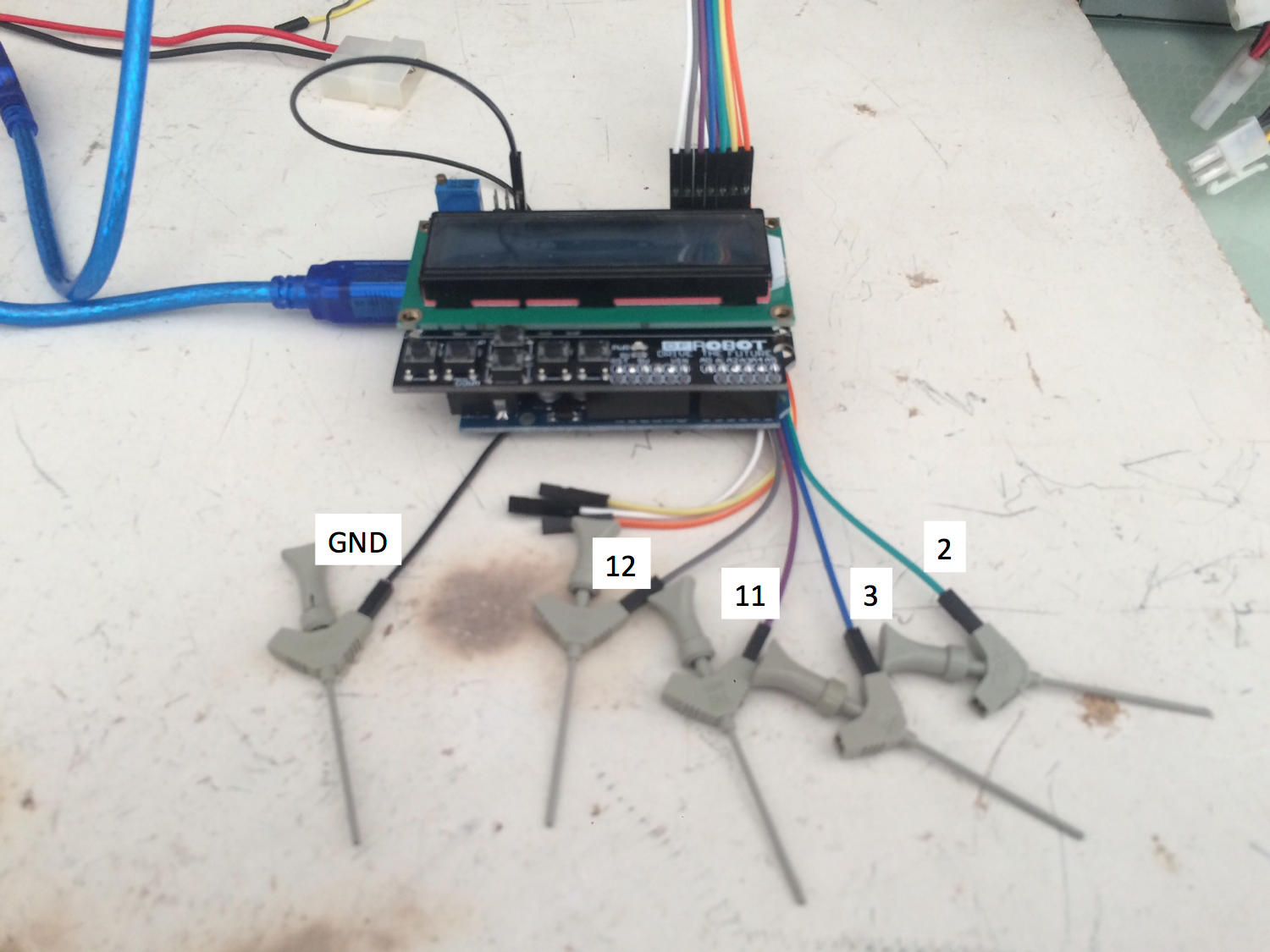
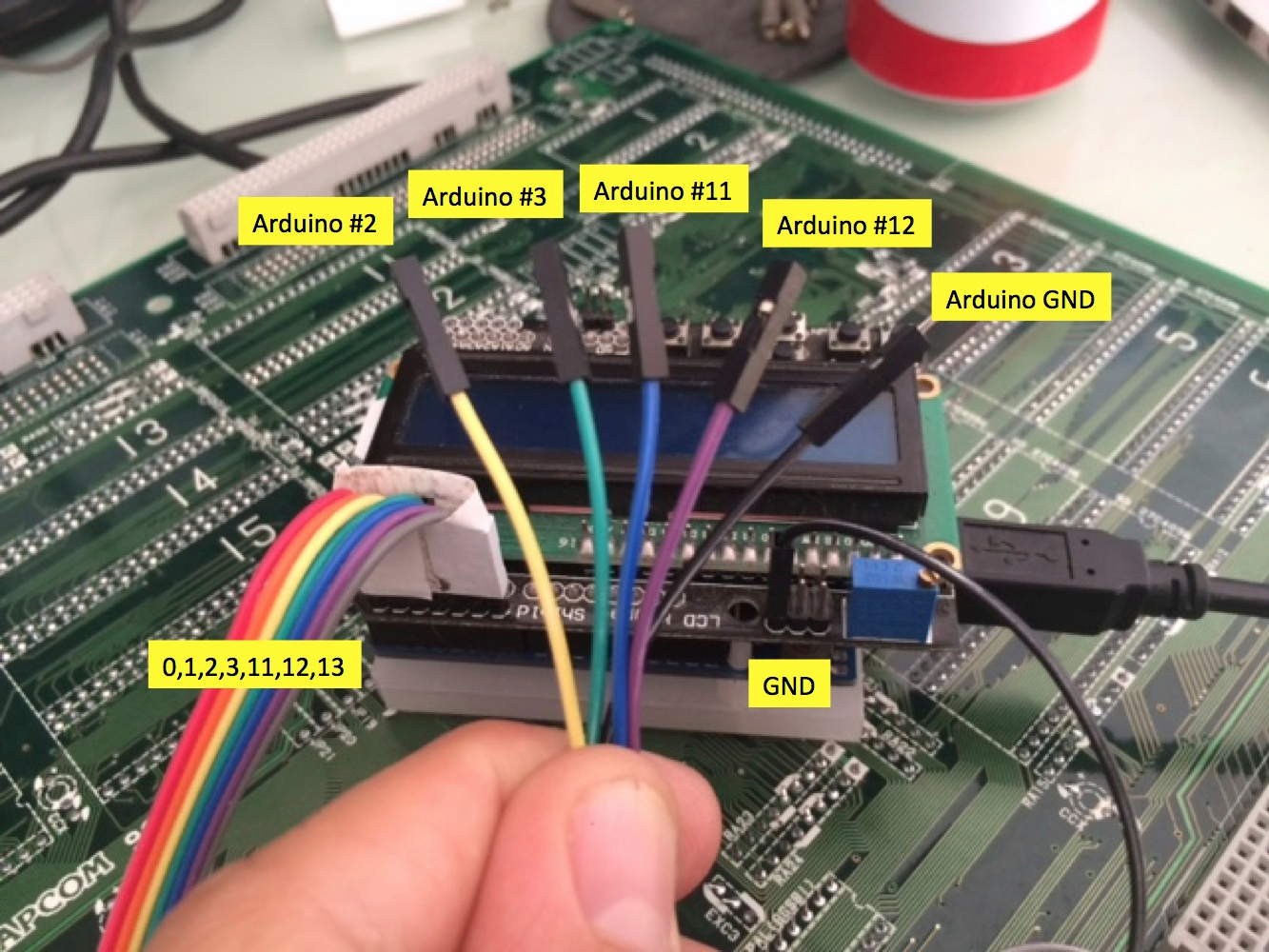
  1. Locate digital pins 2, 3, 11, 12 (top right) and GND (top left icsp connector) on your LCD Keypad Shield. Label them if possible.


  1. Connect the dupont cables to the pinout as shown above. Label them if possible.


Assembling the CPS2 target power cable
Attach two female dupont ends to the female molex power plug.


Identifying your CPS2 B board type
There are several revisions of PCB. These are the relevant ones:


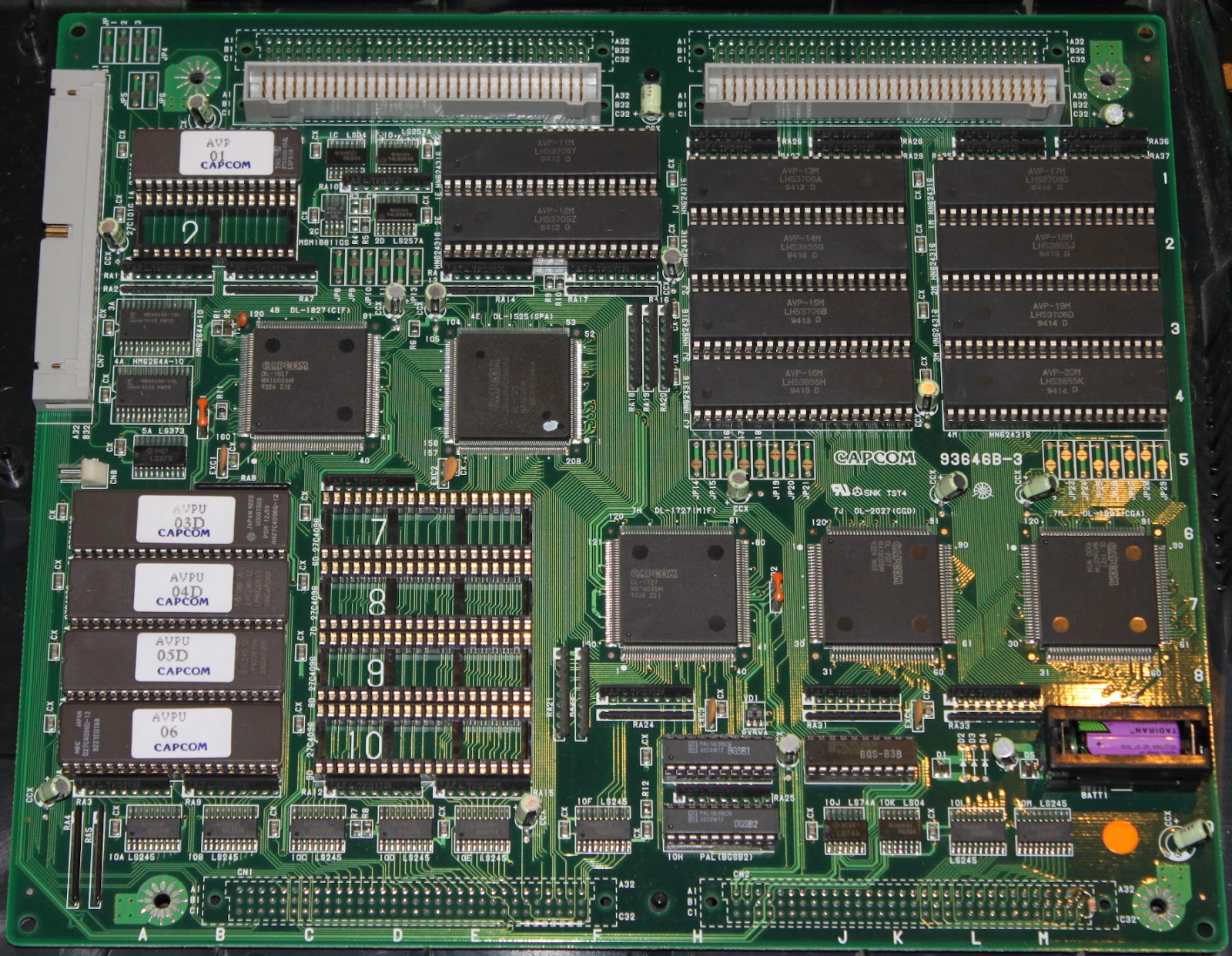
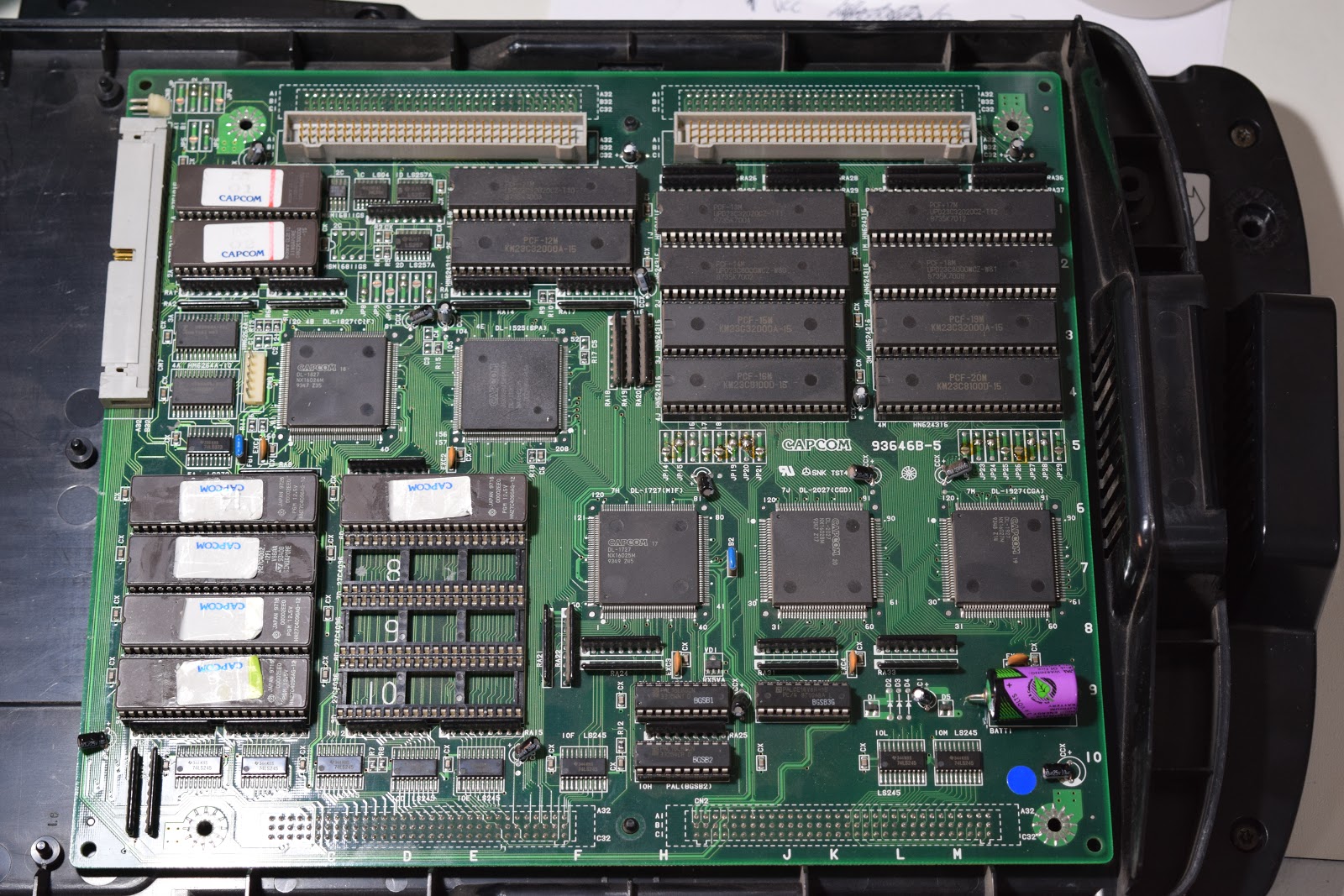
93646B-3:
93646B-3-FRONT.jpg

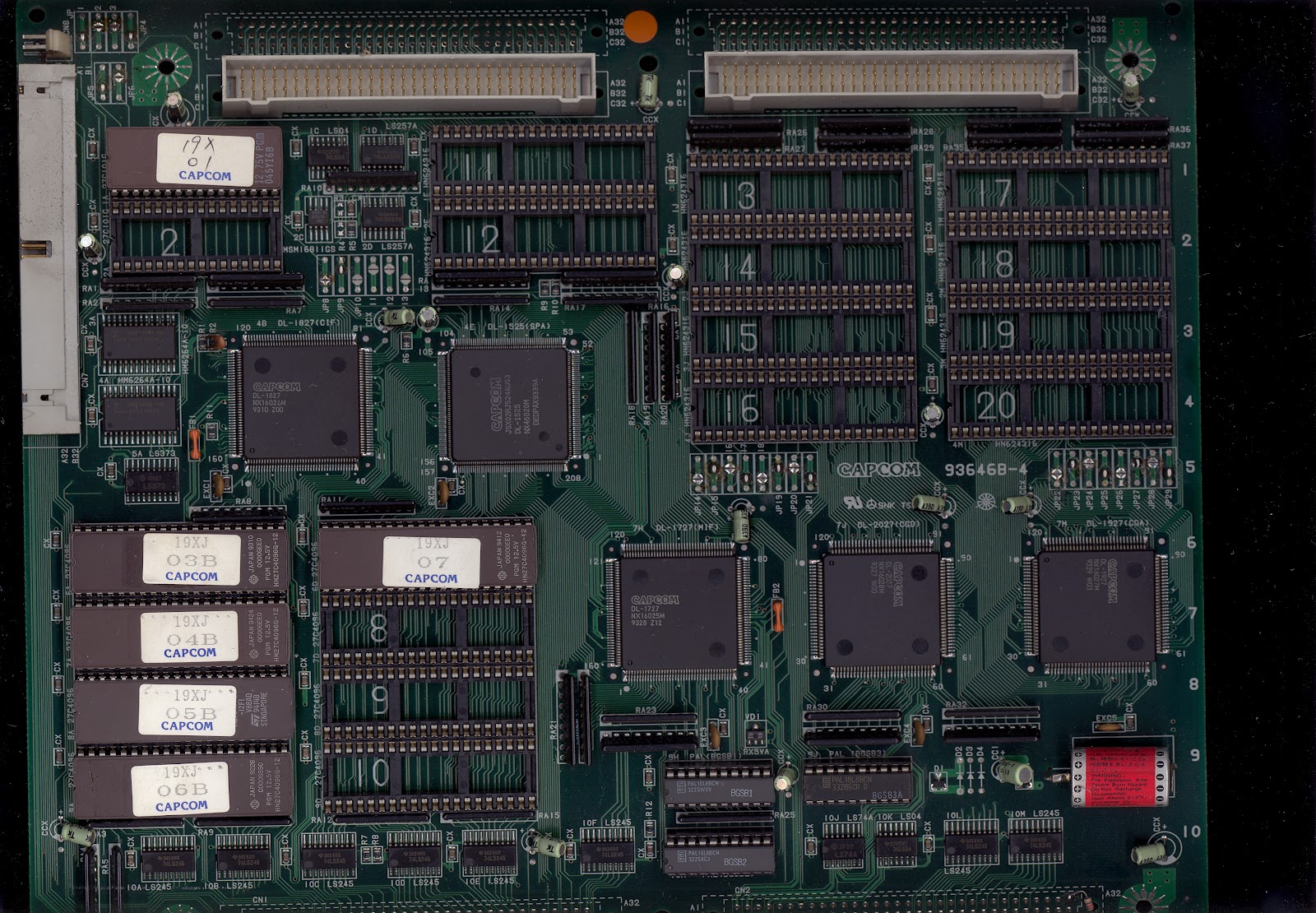
93646B-4:
19xx_pcb_1.jpg


93646B-5:


93646B-6 and 93646B-7:
93646B-6-FRONT.jpg


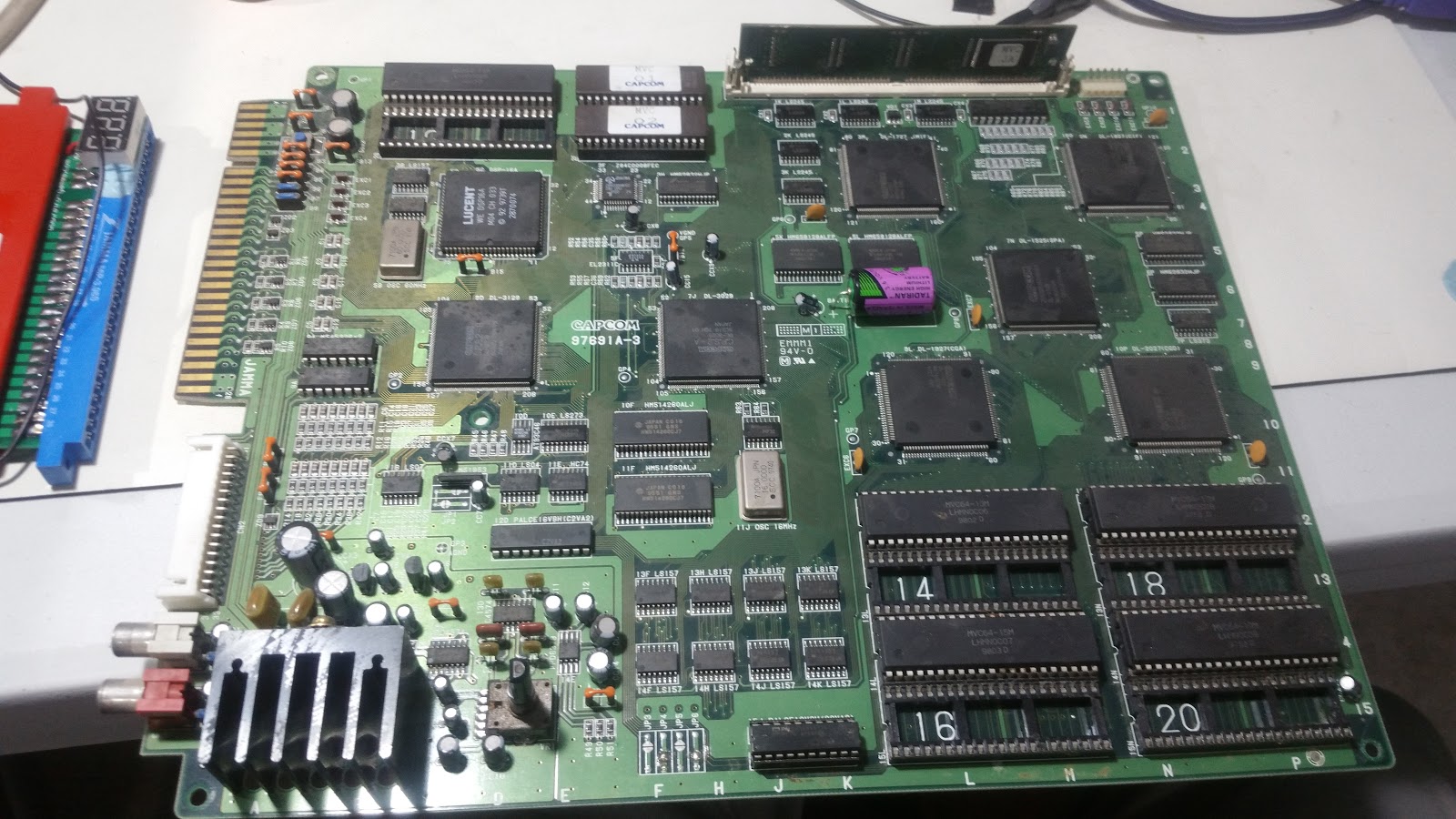
97691A-3 and 97691A-4 (Black case, single board):


Pinout for board revisions 93646B-3 and 93646B-4
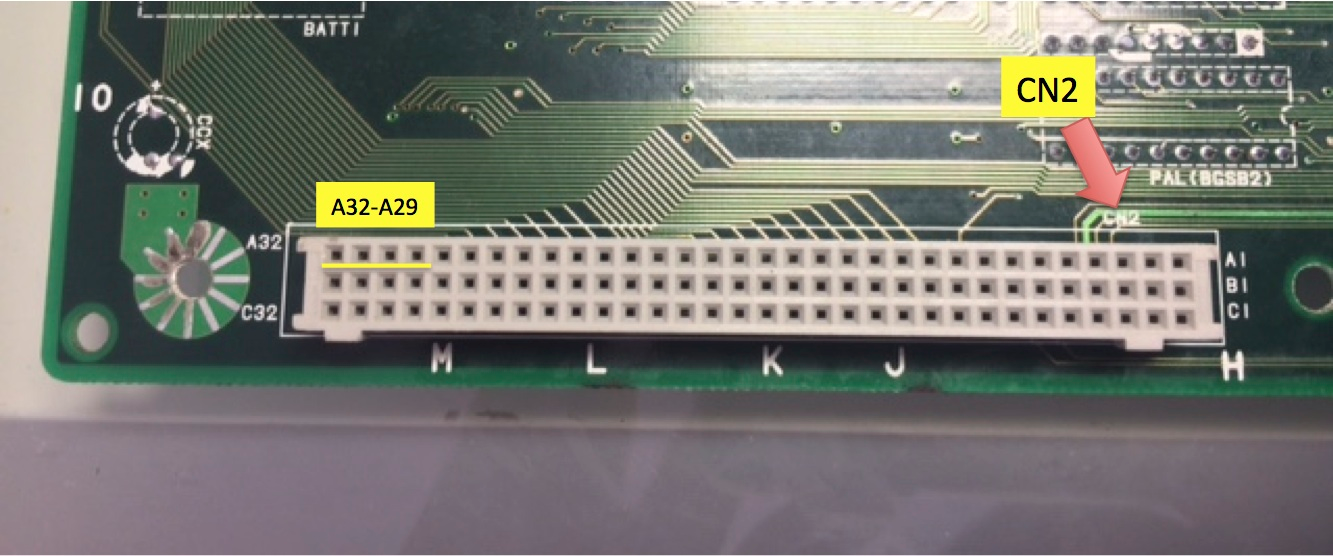
CN2 interface pins:


DATA Arduino #2 → CN2 A32
SETUP1 Arduino #3 → CN2 A30
CLOCK Arduino #11 → CN2 A31
SETUP2 Arduino #12 → CN2 A29


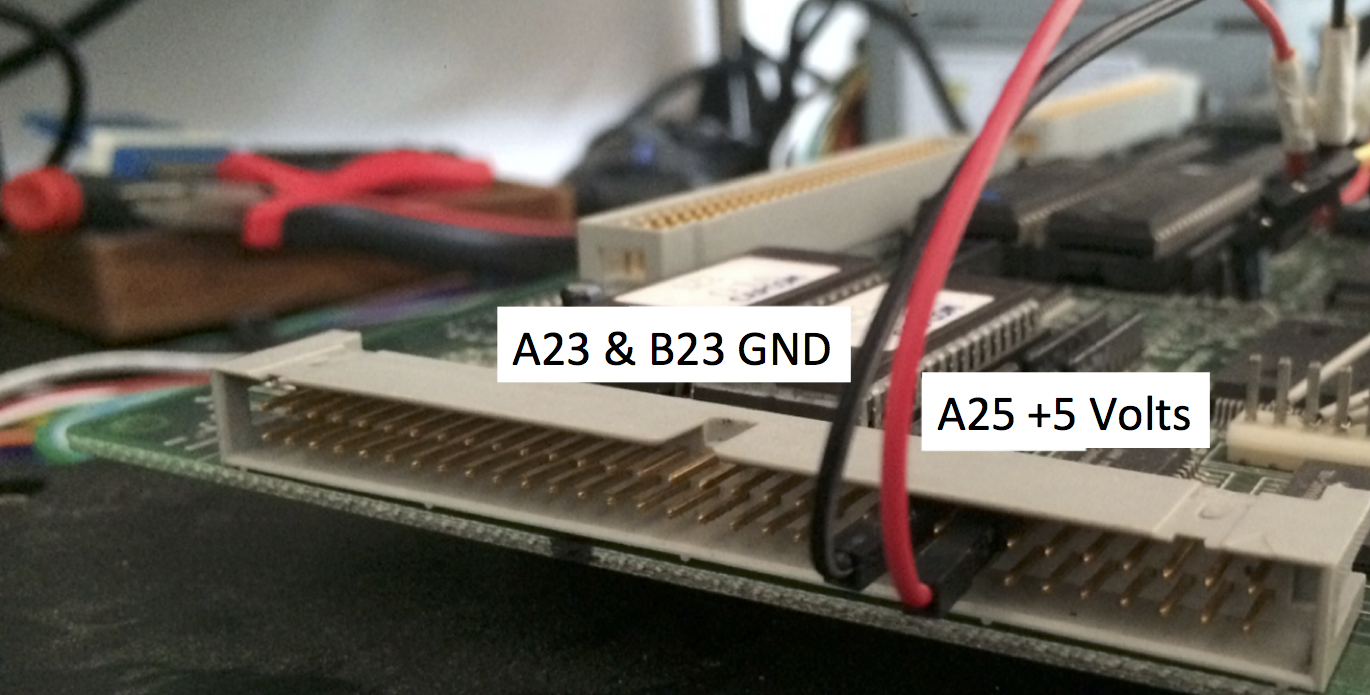
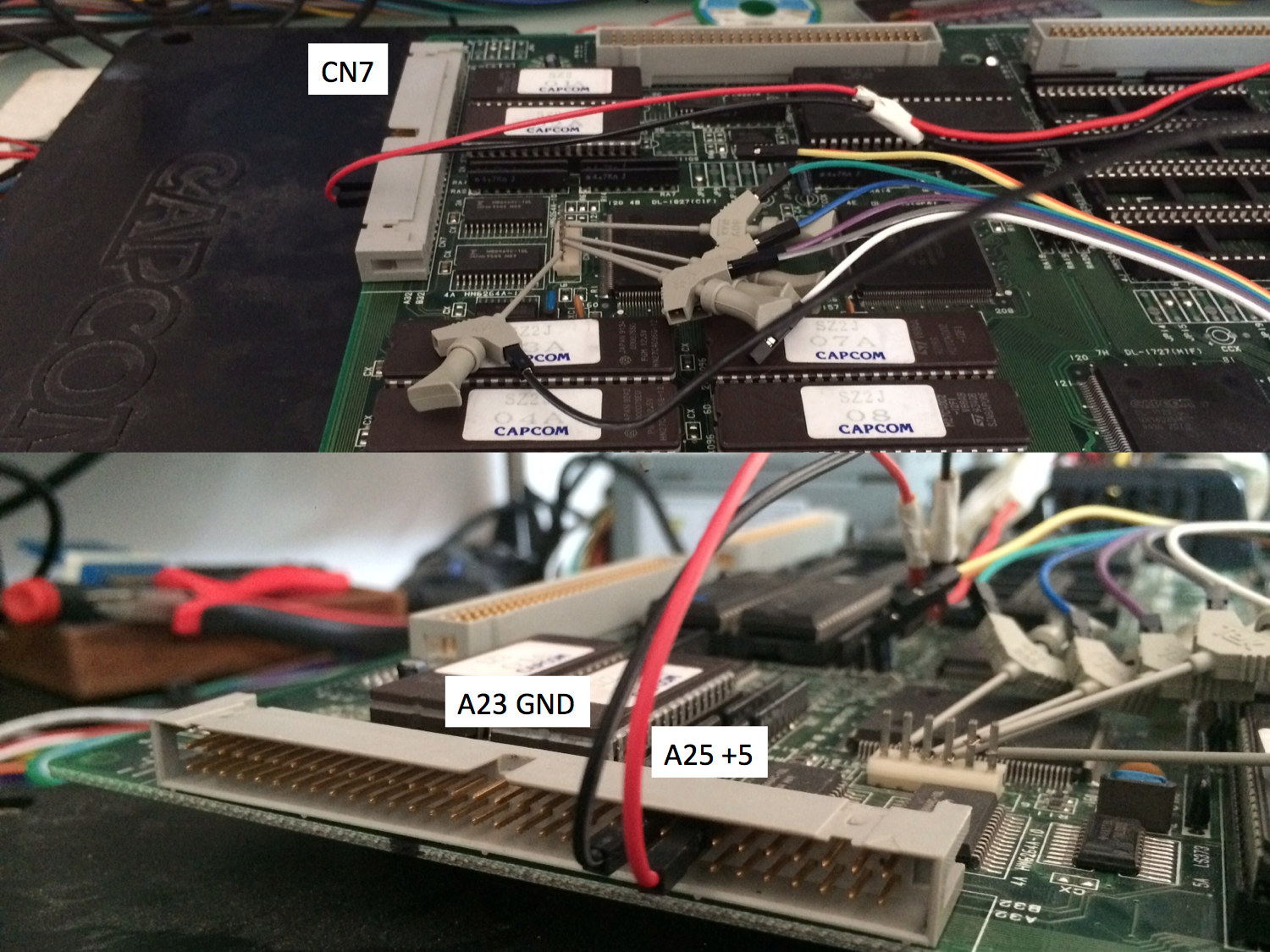
CN7 power pins:


+5V Power supply → CN7 A25
GND Power supply & Arduino GND → CN7 A23
GND Power supply & Arduino GND → CN7 B23


Pinout for board revisions 93646B-5
CN9 interface pins:


DATA Arduino #2 → CN9 #2
SETUP1 Arduino #3 → CN9 #3
CLOCK Arduino #11 → CN9 #4
SETUP2 Arduino #12 → CN9 #5


CN7 power pins:


+5V Power supply → CN7 A25
GND Power supply & Arduino GND → CN7 A23
GND Power supply & Arduino GND → CN7 B23


Pinout for board revision 93646B-6, 93646B-7 and 97691A-3
CN9 pins:

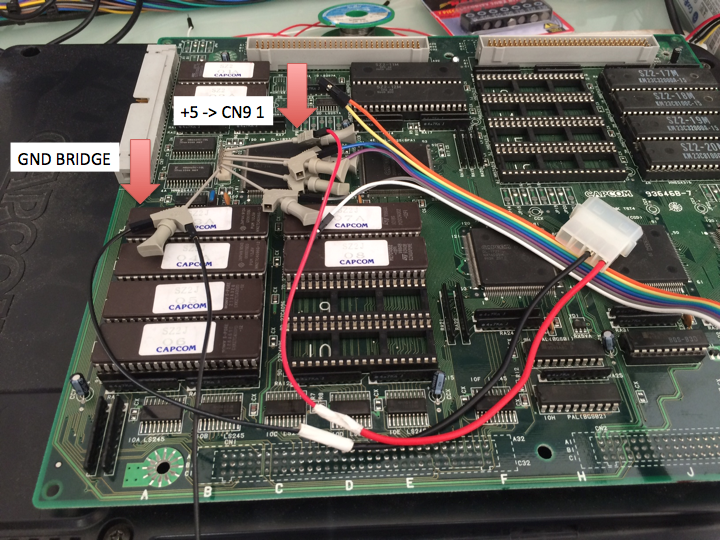
+5V ---------------- → CN9 #1
DATA Arduino # 2 → CN9 #2
SETUP1 Arduino # 3 → CN9 #3
CLOCK Arduino # 11 → CN9 #4
SETUP2 Arduino # 12 → CN9 #5
GND Arduino GND → CN9 #6


Preparing your CPS2 B board
  1. Open the CPS2 B Board plastic case using the Torx Security T20 screwdriver head (the photo below does not apply to revision 97961A-3 "all in one black")


  1. Identify your PCB revision and check the battery voltage


  1. If needed replace the battery with a fresh spare, fit a battery holder when possible


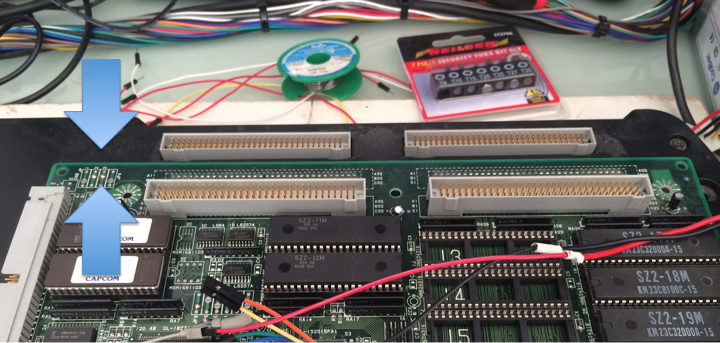
Desuiciding revisions 93646B-3 and 93646B-4
  1. Connect your hooking cables to the corresponding outputs of the arduino programmer (2, 3, 11, 12 & GND)


  1. Connect all pins to CN2 following the order described below.
                                                                                                                                                                
DATA Arduino # 2 → CN2 A32
SETUP1 Arduino # 3 → CN2 A30
CLOCK Arduino # 11 → CN2 A31
SETUP2 Arduino # 12 → CN2 A29


GROUND Arduino # GND → CN2 C32


  1. Connect power cables to CN7 A23 & B23 (GND) and A25 (+5)


cps2img.png


  1. Connect the molex connector to the power supply (power supply off!)


  1. Make sure the CPS2 A board and B board are disconnected from each other


  1. Turn on the power supply connected to your CPS2 B board, then power up your Arduino programmer (plug the USB cable to a USB power source, eg: your computer)


  1. Follow the on-screen instructions and program the game configuration you wish to upload. Use the up/down/right/left buttons to advance through the game options.
  2. Once programmed, disconnect power to the Arduino programmer followed by switching off the main power supply to your CPS2 B board
  3. Disconnect all arduino and power supply wires connected to the PCB
  4. Assemble the CPS2 A and B boards together and test for results. If unsuccessful take your time to review your setup before attempting a new keyload.


Desuiciding revisions 93646B-5, 93646B-6, 93646B-7, 97691A-3, 97691A-4
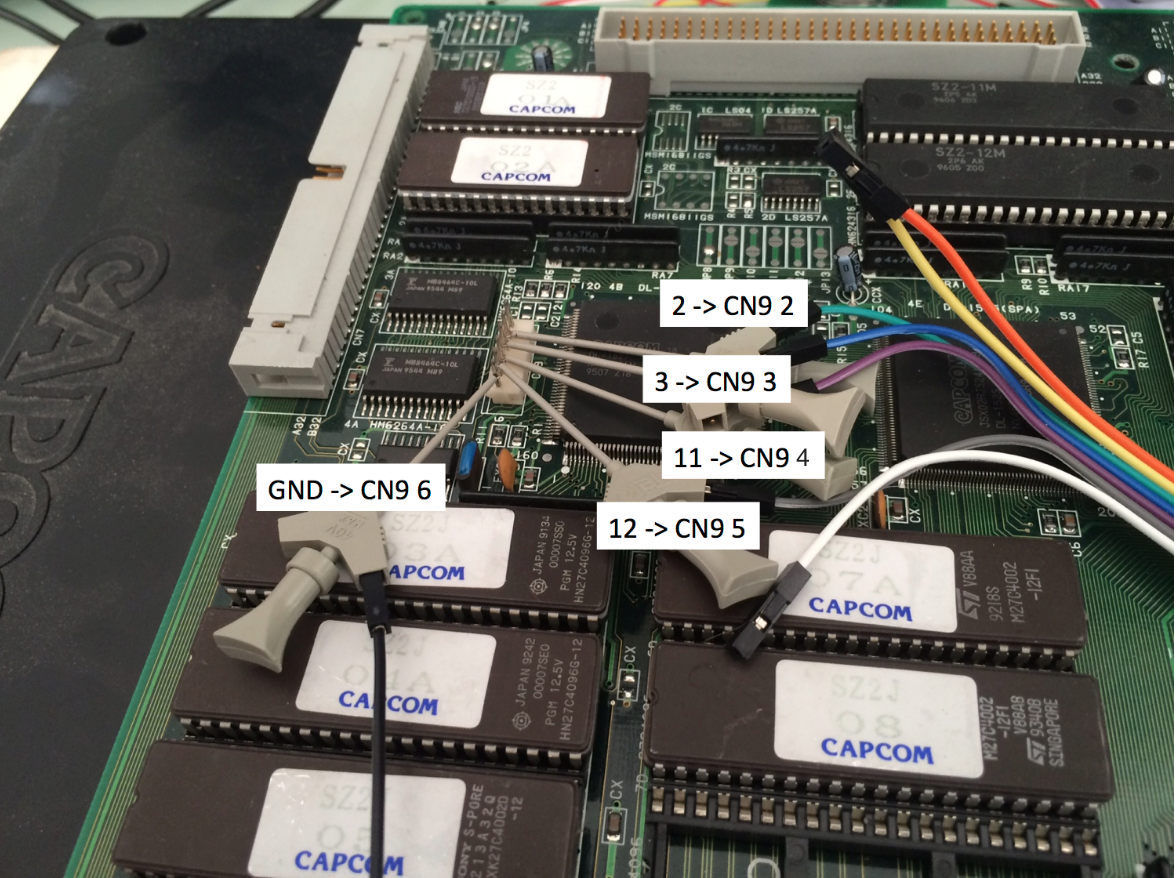
  1. Connect the ic clips to the corresponding outputs of the arduino programmer (2, 3, 11, 12 & GND)


  1. Connect all grabbers to CN9 following this order. You can also use a JST NH 6pin connector, pins are part number SHF-001T-0.8BS or SHF-002T-0.8BS depending on your wire gauge.


DATA Arduino # 2 → CN9 #2
SETUP1 Arduino # 3 → CN9 #3
CLOCK Arduino # 11 → CN9 #4
SETUP2 Arduino # 12 → CN9 #5
GND Arduino GND → CN9 #6


capcom.png


  1. [Revisions 93646B-6, 93646B-7, 97691A-3 only] Attach the power cable as shown below. GND connects to the existing arduino grabber.


  1. [Revision 93646B-5 only] Connect power cables to CN7 A23, B23 (GND) and A25 (+5)


  1. Connect the molex connector to the power supply (power supply off!)


  1. Make sure the CPS2 A board and B board are disconnected from each other


  1. Turn on the power supply connected to your CPS2 B board, then power up your Arduino programmer (plug the USB cable to a USB power source, eg: your computer)


  1. Follow the on-screen instructions and program the game configuration you wish to upload. Use the up/down/right/left buttons to advance through the game options.
  2. Once programmed, disconnect power to the Arduino programmer followed by switching off the main power supply
  3. Disconnect all arduino and power supply wires connected to the PCB
  4. Assemble the CPS2 A and B boards together and test for results. If unsuccessful take your time to review your setup before attempting a new keyload.


Hands-on video tutorial by Artemio

https://www.youtube.com/watch?v=ulIi9B74HMs